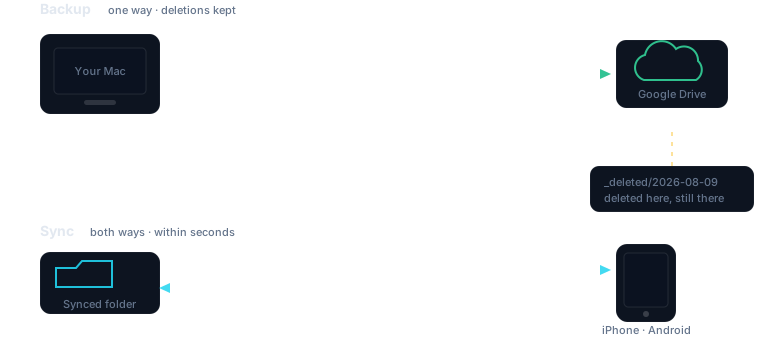
Backup goes one way and keeps what you delete. Sync goes both ways and reaches your phone. A folder is one or the other, never both.
Scheduled Google Drive backups that never hard-delete a file, two-way folder sync that reaches your phone in seconds, and a menu bar that goes amber before you lose anything.
macOS 26 · built on rclone · your files go straight to your own Drive
Backup goes one way and keeps what you delete. Sync goes both ways and reaches your phone. A folder is one or the other, never both.
A pair of hand-rolled backup scripts stopped running for five days and nothing said so. Every file looked fine. The backup was dead. That is the failure this product is built around: a backup you cannot see is a backup you cannot trust. Visibility is the feature, not a nicety bolted on afterwards.
Backup and sync sound similar and behave nothing alike. Mixing them is how people lose files, so a folder can be one or the other — never both.
Your Mac is the source of truth. Files travel up to Drive and never come back down on their own.
Delete something locally and the remote copy is moved to a dated archive, not destroyed. Changed your mind three weeks later? It is still there.
Edit on your Mac, your phone, or another machine. Changes travel in every direction, newest edit wins.
Deletions travel too — that is the trade. Use it for what you actively work on, and use backup for everything you simply want kept.
Built around the ways a backup quietly fails, rather than the ways a demo looks good.
Synced folders are watched, not polled. Save a file and it starts moving within a couple of seconds — so an edit here shows up on your phone while you are still looking at it.
Green while healthy, amber once a backup is genuinely overdue, red after 24 hours or the moment a run fails. You find out from the menu bar, not from a missing file.
Every minute, every five, hourly, nightly — whatever fits the folder. A run that overruns its own interval is skipped, never stacked on top of the one still working.
Success rate, current streak, data protected, average run time, throughput and failures — plus the last thirty runs at a glance. No data yet reads as “—”, never as a reassuring zero.
Google's own consent screen, in your own browser. The app never sees your password — only the token Google hands back, stored in its own file that nothing else can read.
The sync engine ships inside the app. No Homebrew, no PATH, no dependency that can be uninstalled out from under your backups next time you tidy up.
The guarantees are the product. These are enforced in code and covered by tests that fail if anyone removes them.
Remote copies of files you delete locally move into a dated archive folder. This is unconditional — there is no setting that turns it off.
If you already use rclone, your config is yours. This app keeps its own, readable only by you, and never writes to ~/.config/rclone.
A backup already in flight is left alone rather than joined by a second. Two processes writing the same destination is how sync tools corrupt what they were meant to protect.
If the engine could not copy everything, the run is recorded as a failure and the menu bar turns red. A backup that looks healthy while broken is the bug this product was built to kill.
Backup stays free forever. Pro adds two-way sync and everything that makes it instant.
14-day Pro trial, no card. Failure alerts are never paywalled on any tier.
Know your backup is running. Forever.
$0
Every folder, on every device, within seconds.
$29/year
or $4.99/month · $59 once, yours forever
| Capability | Free | Pro |
|---|---|---|
| Folders backed up | 1 | Unlimited |
| Dated archive for deletions | Yes | Yes |
| Two-way sync | — | Unlimited folders |
| Instant sync on change | — | Yes |
| Shortest schedule | Hourly | Every minute |
| Advanced tuning & dry run | — | Yes |
| Run history | 200 runs | 200 runs |
| Failure alerts | Always | Always |
| Devices per licence | 1 | 3 |
These limits are read from licensing/catalog.ts, the same file the app enforces and the licence issuer signs against — so this table cannot drift from what you actually get.
It uses rclone as the engine, and says so plainly. What it adds is the part people get wrong by hand: knowing whether the backup actually ran, refusing to stack runs, keeping deletions recoverable, and keeping backup and sync from overlapping. Those are the failures that cost you files.
Straight into your own Google Drive, from your own machine. There is no dfacto server in the path, and nothing is relayed through us. We could not read your files if we wanted to.
For a backed-up folder, the copy in Drive moves to a dated archive rather than being deleted, so you can go and get it. For a synced folder the deletion travels — that is what two-way sync means, and it is why the two kinds of folder are kept separate.
Yes — point both at the same destination and they converge. Your phone sees the same folder through the Google Drive app, which is what makes an edit on the laptop show up in your pocket.
Trove drops to the free tier and keeps backing up. It does not stop, lock your settings, or hold your history hostage — an expired licence must never be the reason a backup silently stops, which is the exact failure this product exists to prevent. Licences are verified on your machine with no server call, so Trove also keeps working if we are offline or gone.
It is being built in the open and is not ready to hand to anyone yet. Backup, sync, sign-in, scheduling and the dashboard are working; the remaining work is running scheduled backups while the app is closed, and proving the phone round trip end to end. This page will change the day that is true rather than before.